步骤3:设置VB模块
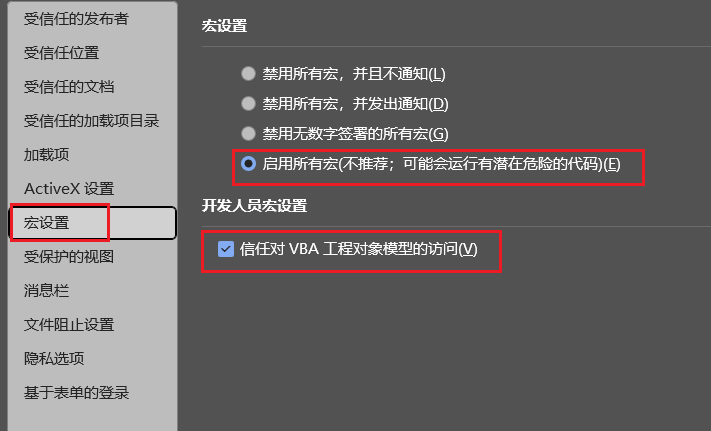
选中右边两项,并确认。
步骤3:设置VB模块

选择【插入】-【模块】,将如下代码填写到右侧。
使用DeepSeek-V3模型(下图以硅基流动平台为例):
1Function CallDeepSeekAPI(api_key As String, inputText As String) As String
2Dim API As String
| 3 | DimSendTxtAsString |
|---|---|
| 4 | DimHttpAsObject |
| 5 | Dimstatus_codeAsInteger |
| 6 | DimresponseAsString |
pletions"
9SendTxt = "{""model"": ""deepseekai/DeepSeek-V3"", ""messages"":
[{""role"":""system"", ""content"":""You are a Word
assistant""}, {""role"":""user"", ""content"":""" & inputText & """}],
""stream"": false}"
10'想用R1模型,就把上面的model的 deepseek-ai/DeepSeek-V3换成deepseek-
ai/DeepSeek-R1 11
12Set Http = CreateObject("MSXML2.XMLHTTP")
13With Http 14.Open "POST", API, False
15.setRequestHeader "Content- Type", "application/json"
16.setRequestHeader "Authorization", "Bearer " & api_key
17.send SendTxt
| 18 | status_code=.Status |
|---|---|
| 19 | response=.responseText |
| 20 | EndWith |
| 21 | Ifstatus_code=200Then |
| 22 | CallDeepSeekAPI=response |
| 23 | Else |
| 24 | CallDeepSeekAPI="Error:"& |
status_code & " - " & response 25End If
30Sub DeepSeekV3()
| 31 | Dimapi_keyAsString |
|---|---|
| 32 | DiminputTextAsString |
| 33 | DimresponseAsString |
| 34 | DimregexAsObject |
| 35 | DimmatchesAsObject |
| 36 | DimoriginalSelectionAsRange |
37 38' API Key
39api_key = ""'填写你自己的API KEY' 40If api_key = "" Then
41MsgBox "Please enter the API key.", vbExclamation
42Exit Sub 43End If
44 45' 检查是否有选中文本
46If Selection.Type <> wdSelectionNormal Then
47MsgBox "Please select text.", vbExclamation
48Exit Sub 49End If
50 51' 保存原始选区
52Set originalSelection = Selection.Range.Duplicate
53 54' 处理特殊字符
55inputText = Selection.Text 56inputText = Replace(inputText, "\",
58inputText = Replace(inputText, vbCr, " ")
59inputText = Replace(inputText, vbLf, " ")
60inputText = Replace(inputText, """", "\""") ' 转义双引号
61 62' 发送 API 请求
63response = CallDeepSeekAPI(api_key, inputText)
64 65' 处理 API 响应
66If Left(response, 5) <> "Error"
Then 67' 解析 JSON
68Set regex = CreateObject("VBScript.RegExp")
69With regex
| 70 | .Global=True |
|---|---|
| 71 | .MultiLine=True |
| 72 | .IgnoreCase=False |
| 73 | .Pattern="""content"":"" |
(.*?)""" ' 匹配 JSON 的 "content" 字段 74End With
75Set matches = regex.Execute(response)
76 77If matches.Count > 0 Then
78' 提取 API 响应的文本内容 79response =
matches(0).SubMatches(0)
Replace(response, "\n", vbCrLf)
83response = Replace(response, "\\", "\") ' 处理
JSON 里的反斜杠 84response =
Replace(response, "&", "") ' 过滤 `&`,防止意外符号
85 86' 让光标移动到文档末尾,防止覆盖
已有内容 87Selection.Collapse
Direction:=wdCollapseEnd 88Selection.TypeParagraph
89Selection.TypeText Text:=response
90 91' 将光标移回原来选中文本的末尾
92originalSelection.Select 93
94Else 95MsgBox "Failed to parse API
response.", vbExclamation 96End If
97Else 98MsgBox response, vbCritical
99End If 100End Sub
101
使用DeepSeek-R1模型(下图以硅基流动平台为例):
4Dim Http As Object 5Dim status_code As Integer
6Dim response As String 7
8API = "https://api.siliconflow.cn/v1/chat/com
pletions"
9SendTxt = "{""model"": ""deepseekai/DeepSeek-R1"", ""messages"":
[{""role"":""system"", ""content"":""You are a Word
assistant""}, {""role"":""user"", ""content"":""" & inputText & """}],
""stream"": false}"
10'想用V3模型,就把上面的model的 deepseek-ai/DeepSeek-R1换成deepseek-
ai/DeepSeek-V3 11
12Set Http = CreateObject("MSXML2.XMLHTTP")
13With Http 14.Open "POST", API, False
15.setRequestHeader "Content- Type", "application/json"
16.setRequestHeader "Authorization", "Bearer " & api_key
17.send SendTxt
| 18 | status_code=.Status |
|---|---|
| 19 | response=.responseText |
| 20 | EndWith |
24 25
| 26 | Ifstatus_code=200Then |
|---|---|
| 27 | CallDeepSeekAPI=response |
| 28 | Else |
| 29 | CallDeepSeekAPI="Error:"& |
status_code & " - " & response 30End If
31 32Set Http = Nothing
33End Function 34
35Sub DeepSeekV3()
| 36 | Dimapi_keyAsString |
|---|---|
| 37 | DiminputTextAsString |
| 38 | DimresponseAsString |
| 39 | DimregexAsObject |
| 40 | DimmatchesAsObject |
| 41 | DimoriginalSelectionAsRange |
42 43' API Key
44api_key = ""'填写你自己的API KEY' 45If api_key = "" Then
46MsgBox "Please enter the API key.", vbExclamation
47Exit Sub 48End If
49 50' 检查是否有选中文本
51If Selection.Type <> wdSelectionNormal Then
53Exit Sub 54End If
55 56' 保存原始选区
57Set originalSelection = Selection.Range.Duplicate
58 59' 处理特殊字符
60inputText = Selection.Text 61inputText = Replace(inputText, "\",
"\\")
62inputText = Replace(inputText, vbCrLf, " ")
63inputText = Replace(inputText, vbCr, " ")
64inputText = Replace(inputText, vbLf, " ")
65inputText = Replace(inputText, """", "\""") ' 转义双引号
66 67' 发送 API 请求
68response = CallDeepSeekAPI(api_key, inputText)
69 70' 处理 API 响应
71If Left(response, 5) <> "Error"
Then 72' 解析 JSON
73Set regex = CreateObject("VBScript.RegExp")
74With regex
78.Pattern = """content"":""
(.*?)""" ' 匹配 JSON 的 "content" 字段 79End With
80Set matches = regex.Execute(response)
81 82If matches.Count > 0 Then
83' 提取 API 响应的文本内容 84response =
matches(0).SubMatches(0)
85 86' 处理转义字符
87response = Replace(response, "\n", vbCrLf)
88response = Replace(response, "\\", "\") ' 处理
JSON 里的反斜杠 89response =
Replace(response, "&", "") ' 过滤 `&`,防止意外符号
90 91' 让光标移动到文档末尾,防止覆盖
已有内容 92Selection.Collapse
Direction:=wdCollapseEnd 93Selection.TypeParagraph
94Selection.TypeText Text:=response
96' 将光标移回原来选中文本的末尾 97originalSelection.Select
response.", vbExclamation 101End If
102Else 103MsgBox response, vbCritical
104End If 105End Sub
使用千问2.5模型(以阿里云百炼平台为例):
1Function CallDeepSeekAPI(api_key As String, inputText As String) As String
2Dim API As String
| 3 | DimSendTxtAsString |
|---|---|
| 4 | DimHttpAsObject |
| 5 | Dimstatus_codeAsInteger |
| 6 | DimresponseAsString |
7 8API =
"https://dashscope.aliyuncs.com/compati ble-mode/v1/chat/completions"
9SendTxt = "{""model"": ""qwen-max- 0125"", ""messages"":
[{""role"":""system"", ""content"":""You are a Word
assistant""}, {""role"":""user"", ""content"":""" & inputText & """}],
""stream"": false}"
10 11Set Http =
CreateObject("MSXML2.XMLHTTP")
12With Http
15.setRequestHeader "Authorization", "Bearer " & api_key
16.send SendTxt
| 17 | status_code=.Status |
|---|---|
| 18 | response=.responseText |
| 19 | EndWith |
| 20 | Ifstatus_code=200Then |
| 21 | CallDeepSeekAPI=response |
| 22 | Else |
| 23 | CallDeepSeekAPI="Error:"& |
status_code & " - " & response 24End If
25 26Set Http = Nothing
27End Function 28
29Sub DeepSeekV3()
| 30 | Dimapi_keyAsString |
|---|---|
| 31 | DiminputTextAsString |
| 32 | DimresponseAsString |
| 33 | DimregexAsObject |
| 34 | DimmatchesAsObject |
| 35 | DimoriginalSelectionAsRange |
36 37' API Key
38api_key = ""'填写你自己的API KEY' 39If api_key = "" Then
40MsgBox "Please enter the API key.", vbExclamation
41Exit Sub 42End If
wdSelectionNormal Then 46MsgBox "Please select text.",
vbExclamation 47Exit Sub
48End If 49
50' 保存原始选区 51Set originalSelection =
Selection.Range.Duplicate 52
53' 处理特殊字符 54inputText = Selection.Text
55inputText = Replace(inputText, "\", "\\")
56inputText = Replace(inputText, vbCrLf, " ")
57inputText = Replace(inputText, vbCr, " ")
58inputText = Replace(inputText, vbLf, " ")
59inputText = Replace(inputText, """", "\""") ' 转义双引号
60 61' 发送 API 请求
62response = CallDeepSeekAPI(api_key, inputText)
63 64' 处理 API 响应
65If Left(response, 5) <> "Error"
Then 66' 解析 JSON
68With regex
| 69 | .Global=True |
|---|---|
| 70 | .MultiLine=True |
| 71 | .IgnoreCase=False |
| 72 | .Pattern="""content"":"" |
(.*?)""" ' 匹配 JSON 的 "content" 字段 73End With
74Set matches = regex.Execute(response)
75 76If matches.Count > 0 Then
77' 提取 API 响应的文本内容 78response =
matches(0).SubMatches(0)
79 80' 处理转义字符
81response = Replace(response, "\n", vbCrLf)
82response = Replace(response, "\\", "\") ' 处理
JSON 里的反斜杠 83response =
Replace(response, "&", "") ' 过滤 `&`,防止意外符号
84 85' 让光标移动到文档末尾,防止覆盖
已有内容 86Selection.Collapse
Direction:=wdCollapseEnd 87Selection.TypeParagraph
88Selection.TypeText
91originalSelection.Select 92
93Else 94MsgBox "Failed to parse API
response.", vbExclamation 95End If
96Else 97MsgBox response, vbCritical
98End If 99End Sub
100
从如下链接获取:
https://bailian.console.aliyun.com
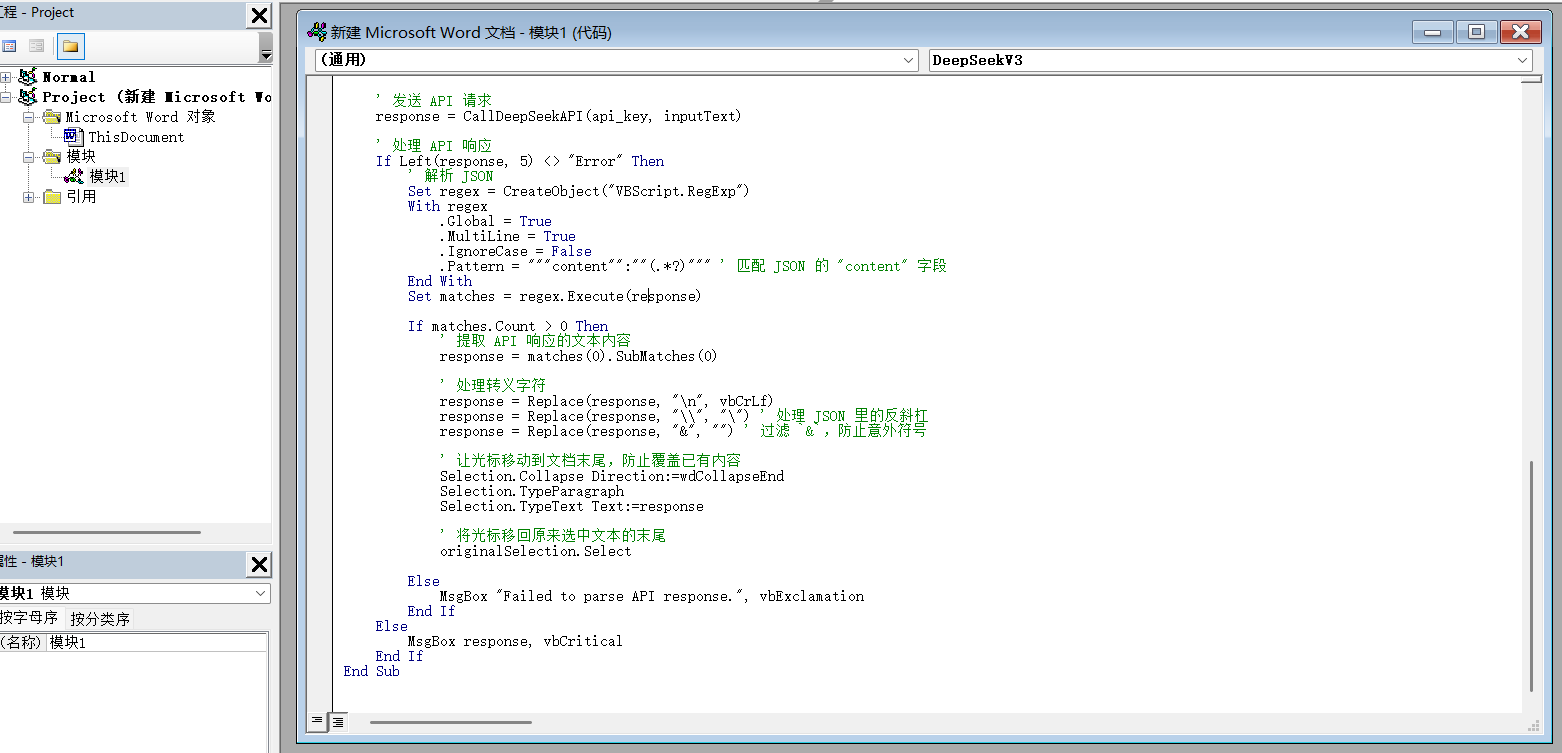
填写以后:
保存: